
Free HR Excel template for UAE businesses
Free UAE HR Excel Toolkit (2026)
Employee Records, Visa Expiry Tracker, Leave Calendar & HR Dashboard
Track employee information, monitor document renewals, review leave requests and organise HR follow-ups in one free Excel workbook.
Free download · No signup · Blank workbook + fictional worked example
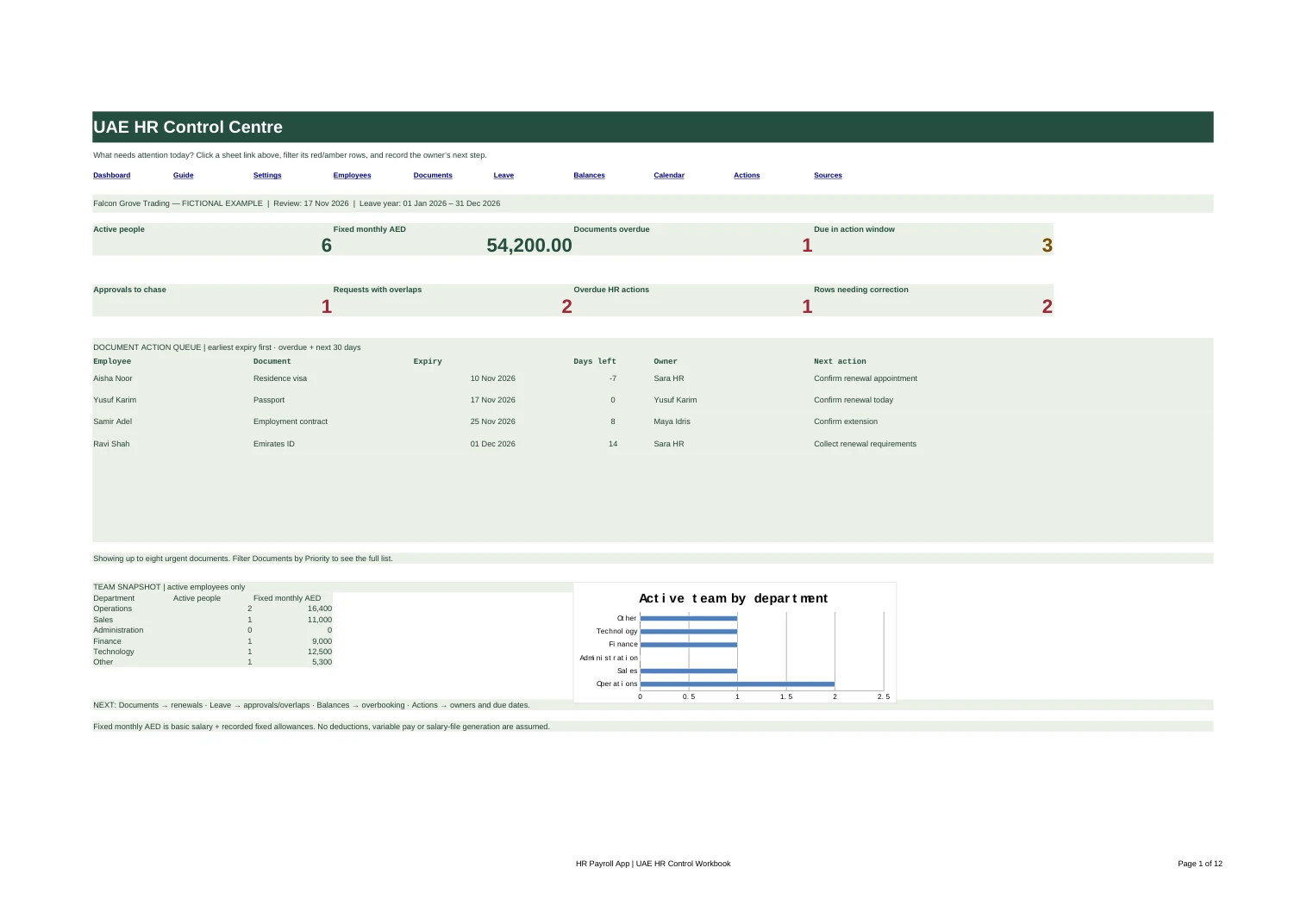
A clearer start to your HR day
Who’s away?
What’s expiring?
What needs a decision?
Your employee list is only the beginning. There are documents to renew, leave requests to review and follow-ups that need an owner.
This toolkit connects those everyday tasks. Enter employees once, use their IDs across the workbook, and open the dashboard to see where your attention is needed.
One workbook. A practical view of what to do next.
More than an employee list.
A working HR control toolkit.
Employee records & compensation
Keep employee names, departments, locations, managers, joining dates and status together. Record basic salary and fixed allowances in AED, with active-team totals by department.
Visa & document expiry tracker
Track residence visas, Emirates IDs, passports, work permits, insurance and contracts using their actual expiry dates. Assign a renewal owner and next step. The dashboard brings the earliest urgent renewals to the top.
Leave requests & overlap flags
Record requested dates, leave types, decisions and approvers. Spot employee or team date overlaps and see pending requests that need chasing.
Annual leave planning balances
Enter confirmed allowances and carry-in. Review approved bookings, pending requests and the remaining unbooked balance. Choose calendar or working days, with configurable weekends, holidays and half-days.
A shared monthly view
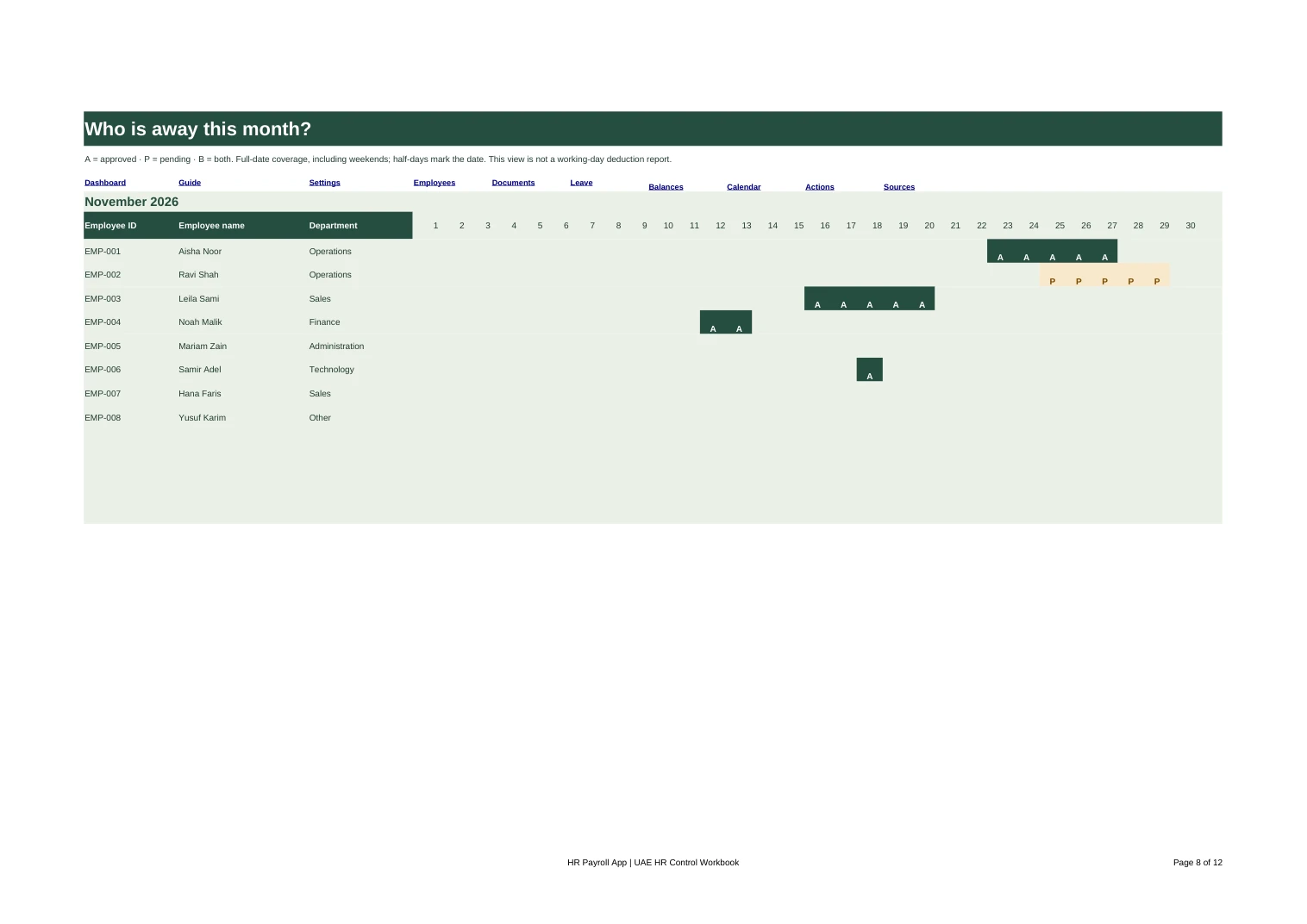
Choose a month to see approved and pending leave across your team. Plan coverage with dates in front of you, rather than searching through separate employee files.
Owned HR follow-ups
Give each action one owner, a due date and a status. Overdue tasks appear on the dashboard, alongside renewals, approval follow-ups and records needing correction.
Eleven connected sheets, dropdowns, filters and built-in instructions. No macros, account or subscription needed to use the workbook.
See the dates together
Plan around leave.
Not last-minute surprises.
The calendar marks approved and pending leave. The request log flags overlapping dates for review, while the balance sheet keeps pending requests separate from approved bookings.
Choose your starting point.
Both downloads are Excel (.xlsx) workbooks. The example shows how the connected sheets work; the blank version is ready for your own company information.
Blank UAE HR Toolkit
Clean input sheets with the formulas, dropdowns, dashboard and instructions in place.
Download Blank Toolkit100 employee slots · 400 document records · 500 leave requests · 200 HR actions
Worked Example
Explore eight fictional employees, approaching renewals, overlapping leave and HR follow-ups. Start here if you’d like to see the toolkit in action.
Download Worked ExampleAll names, dates, salaries and records are fictional examples.
Just need a simple employee list? Download the UAE Employee Records Template instead.
From download to a clearer HR picture.
1. Set your company’s rules
Open Guide, then Settings. Choose the review date, leave year, calendar month and weekend pattern. Add confirmed company holidays and employee leave allowances.
2. Add your people once
Enter your employees with unique internal IDs. Use the dropdowns to keep departments, statuses and leave-day counting consistent.
3. Record the work around them
Add document expiry dates, leave requests and HR actions. Set owners, record decisions and keep the next step clear.
4. Review, act and update
Open Dashboard to see what needs attention. Follow its sheet links, filter the relevant records and update them as work is completed.
White cells with blue text are inputs. Green-tinted cells contain formulas. The workbook flags missing dates, duplicate IDs and incomplete records so they’re easier to put right.
Before you download
A few practical
questions answered.
Is the UAE HR Excel Toolkit really free?
Yes. Download the blank workbook and worked example without signing up or giving us your email address. You can use them for your internal HR administration.
How is this different from the employee records template?
The employee records template is a simple list for organising employee details. This toolkit connects employee records with document renewals, leave requests, balances, a monthly calendar, HR follow-ups and an action dashboard.
How do the visa expiry reminders work?
Enter each document’s expiry date, owner and next action. The workbook calculates days remaining and highlights overdue or upcoming renewals against your chosen review date. Open the dashboard to review them; these are visible workbook flags, not email notifications.
Can we use our own leave policies and weekends?
Yes. Set your company weekend pattern and confirmed holidays, then enter each employee’s agreed period allowance, carry-in and calendar-day or working-day basis. The workbook calculates booking balances using those inputs, rather than assuming one entitlement rule applies to everyone.
Does it handle half-days and leave across two years?
Yes. You can record a half-day reduction, and leave spanning two reporting years is counted only for the dates falling inside the selected leave year. The Guide explains how to enter these requests.
Which spreadsheet application should I use?
The toolkit is designed for modern desktop Excel and uses standard spreadsheet formulas without macros. Calculation tests were run in LibreOffice Calc. If you use Google Sheets or another spreadsheet app, check the imported formatting and formulas before using your own records.
Can I reuse the toolkit next year?
Yes. Keep a copy of the completed year, then start a new workbook with the new reporting dates, confirmed allowances and carry-in figures. The Guide explains which inputs to update while keeping the formulas.
Can you help us move from Excel to a connected HR system?
Yes. Book a free demo and show us how you manage records, renewals and leave today. We’ll walk through how those processes could work together in HR & Payroll App.
Start with a better workbook
Less scattered admin.
A clearer next step.
Download the toolkit, explore the example and bring your everyday HR tasks into one place.
When you’re ready for a connected system, explore HR & Payroll App, see leave management or view pricing.